
Perplexity AI is an AI-powered search engine that answers your questions in plain language and backs up every response with cited sources instead of a list of links. You type a question the way you'd ask a colleague, and it analyzes the web on your behalf, then gives you a farily complete summary that you can then verify. For anyone who spends hours a week digging through search results, comparing sources, or trying to keep research organized, Perplexity AI can be a game-changer in your day-to-day office life.
This guide breaks down what Perplexity AI actually does, where it fits into a marketing team's daily research, and how to use it in the most efficient way possible.

What Is Perplexity AI?
Perplexity AI is a conversational search engine that combines large language models with real-time web search to answer questions directly, rather than returning a ranked list of pages. Instead of scanning ten open tabs to piece together an answer, you get a written response with the sources linked inline, so you can check where each claim came from.
The company built its identity around the idea of giving people a fast, trustworthy way to research a topic without the back-and-forth of traditional search. That focus on citation and verification is what separates Perplexity from other AI chatbots. It's less concerned with generating original content and more focused on finding, synthesizing, and sourcing existing information accurately.
How This AI Search Engine Works
Perplexity AI doesn't rely on a single model to generate your answer. It draws on several large language models, plus its own in-house models, to interpret your question and decide how to search for it. Once it identifies your intent, it searches indexed web content in real time, pulls the most relevant passages, and writes a summary with citations attached.
Generative AI Meets Conversational Search
Perplexity AI uses generative AI to understand what you're actually asking, including follow-up questions in the same conversation. This is what makes it feel conversational rather than transactional. You can ask a question, refine it, and keep building on the thread without starting from scratch each time.
Getting Real-Time, Accurate AI Answers
Because Perplexity continuously indexes web content, its answers reflect current information rather than a frozen training snapshot. Every claim in a response is tied to a source you can click through and check, which matters especially if you're using the tool for anything you'll repeat to a client or a boss. The trade-off is that Perplexity's own writing style is generally more utilitarian than creative. It's built to summarize and verify, not to draft a full campaign brief from scratch.
Top Uses for Marketing Teams
Marketing teams spend a disproportionate amount of time researching competitors, trends, platform updates, audience behavior, and more. Perplexity AI compresses a lot of that work into a single search, which is where the time savings show up fastest.
Accelerating Web Research and Market Analysis
Instead of opening a dozen tabs to compare competitor pricing, recent campaign moves, or industry benchmarks, you can ask Perplexity AI to pull that information together in one go, complete with sources. It's particularly useful for:
- Summarizing market trends or industry reports before a planning meeting
- Comparing competitor positioning or messaging across several sources at once
- Checking a statistic or claim before it goes into a client deck
Boosting AI Productivity
For anyone managing a broader strategy, the value isn't just speed but staying current without dedicating hours to it. Perplexity can track industry news, summarize what's changed since your last check-in, and flag shifts worth acting on. Used well, it becomes less of a search tool and more of a standing research assistant that keeps you briefed between meetings.
The key lies in writing clear, descriptive, and complete prompts in order to generate a response that is as close as possible to your desired output.
Getting Started With Your New Research Assistant
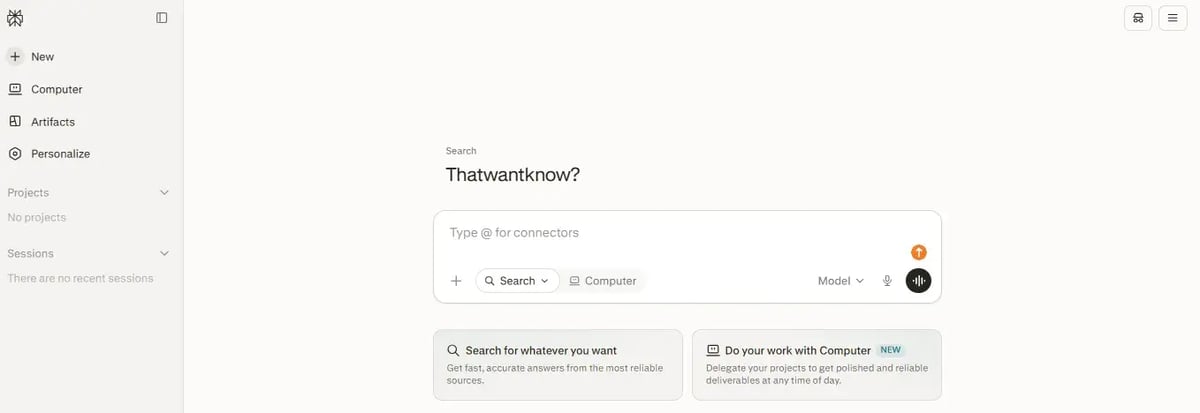
Signing up for Perplexity AI is straightforward. All you have to do is log in through your Google account, and you'll have access to basic search, a limited number of deeper Pro Searches per day, and file uploads. Paid tiers unlock more searches per day, access to more advanced backend models, and the ability to search your own uploaded documents alongside the web.
Setting Up Your Account for Success
Once you're in, take a few minutes to personalize your settings. Perplexity lets you set preferences for tone, formatting, and the kind of sources you want prioritized, and those preferences shape every answer going forward. It's a small step that's easy to skip, but it pays off the more you use the tool.
Best Practices To Get the Most Out of Perplexity AI
The quality of your answer depends heavily on the quality of your question, a rule that applies across most AI tools, not just Perplexity AI. A few habits make a real difference. Here are some that we recommend:
- Be specific about what you want, including format (a table, a bulleted list, a short paragraph)
- Give context about your industry, audience, or goal so that the answer isn't generic
- Ask follow-up questions in the same thread instead of starting a new search each time
Vague prompts produce vague answers, so treat your first question as a starting point you'll refine rather than a one-shot request.
Perplexity AI vs. ChatGPT vs. Claude vs. Gemini
Perplexity AI, ChatGPT, Claude, and Gemini all use large language models (LLMs), but they're built for different jobs. Perplexity AI has a search-first business model, as its whole design centers on citing sources and pulling current information from the web.
On the other hand, ChatGPT, Claude, and other conversational AI assistants started as general-purpose tools built for drafting, brainstorming, and reasoning through problems, and each has since added its own web-search capabilities on top of that foundation.
|
Tool |
Best for |
Limitation |
|
Perplexity AI |
Cited, real-time research and fact-checking |
Less suited for long-form creative writing |
|
ChatGPT |
Drafting, brainstorming, general problem-solving |
Web search is a feature rather than the core design. Is superior in paid plan |
|
Claude |
Careful reasoning, longer documents, nuanced writing |
Search is an add-on rather than default |
|
Gemini |
Integration with Google's ecosystem and Search |
Answers can lean toward Google's own index |
If your priority is a verifiable answer with sources attached, Perplexity AI's design gets you there fastest. If you need help writing, structuring, or reasoning through a complex problem, a general-purpose assistant is usually the better fit. Many teams end up using both depending on the task at hand.
Perplexity's Comet Browser
Comet is Perplexity's AI-powered web browser, built to bring the same search-and-summarize approach directly into your browsing experience instead of keeping it in a separate tab. It can summarize an open article, compare how different sources are covering the same story, help draft an email reply based on your inbox, and carry out multi-step tasks like researching a topic across several sites and pulling the findings together.
For a marketer, that means less time switching between a search tab and your actual work. You can research a competitor's landing page, summarize the findings, and draft a response, all inside the same browser window. Comet is available as a free download for Mac, Windows, iOS, and Android, which makes it easy to try without committing to a paid plan first.
All in all, if used correctly, Perplexity AI and Comet can prove to be the tools that you need.

Marina Avilés
.webp)
Leave your comment and join the conversation