
In digital marketing, staying ahead of platform updates is key to maintaining high-performing campaigns. One of Google’s latest innovations, Google AI Max, is designed to revolutionize how advertisers manage and optimize Search campaigns. By combining the analytical power of Google Analytics with new AI-driven automation tools, marketers can make smarter decisions faster and at scale.
Google AI Max uses machine learning to enhance ad relevance, targeting, and bidding strategies in real time. For marketing executives, this means improved campaign performance with less manual management. In this guide, you’ll learn what AI Max is, how it works, and how to use it effectively to boost your paid advertising results.

What Is Google AI Max?
Google AI Max is a collection of AI-powered features within Google Ads that help advertisers refine audience targeting, improve ad text, and increase Search campaign visibility. Unlike Performance Max (PMax) campaigns, which extend across YouTube, Display, and other Google properties, AI Max focuses exclusively on search-based advertising.
It functions as an enhancement layer that learns from past data, user intent, and engagement metrics to optimize performance automatically. The result is a system that continuously improves without requiring daily manual adjustments.
AI Max integrates seamlessly with other Google tools, including SEM and PPC strategies, to deliver smarter and more consistent results. It’s an ideal complement for marketers who want greater automation without losing creative and strategic control.
By combining data with artificial intelligence, Google AI Max represents a new stage in AI in marketing where human creativity and machine precision coexist to produce measurable business outcomes.
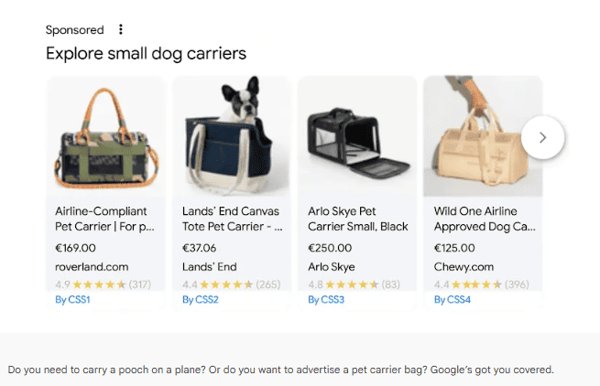 Source: business.google.com
How to Set Up an AI Max Account
Setting up AI Max is simple if you already use Google Ads. The key is preparing your campaigns so the AI can learn efficiently and optimize performance.
1. Check Account Compatibility
Ensure your search campaign has recent performance data and an active billing setup. AI Max requires at least two weeks of historical data to begin learning effectively.
Connect your account to Google Analytics 4 to track conversions and audience insights accurately. The richer your data, the faster the system can generate actionable recommendations.
2. Activate AI Max
In your Google Ads dashboard, go to your search campaign settings and enable AI Max. You can either upgrade an existing campaign or create a new one. Choose your goal (sales, leads, or traffic), and the system will start analyzing your setup to provide bid and keyword suggestions.
3. Define Creative Assets
Upload multiple variations of headlines, descriptions, and visuals. The AI will dynamically test combinations to determine which performs best. A diverse creative library ensures the algorithm learns quickly and identifies what resonates with your target audience.
4. Set Budget and Bidding
Start with automated bidding to let the AI gather initial insights. As you go along, review performance and adjust if needed. Combining automation with manual reviews helps maintain both efficiency and control.
5. Monitor and Adjust
Use dashboards in Google Ads and Google Analytics to track key metrics. While AI Max optimizes automatically, human strategy is essential for interpreting data and aligning results with business goals.
Key Features of AI Max
AI Max’s strength lies in its combination of automation, predictive analytics, and creative flexibility. It offers:
- Smarter keyword targeting. Automatically refines keyword relevance to match high-intent users.
- Automated ad text generation. Suggests optimized headlines and descriptions using generative AI.
- Intelligent landing page selection. Routes users to the most effective landing pages based on engagement and conversion data.
- Predictive bidding. Uses real-time forecasting to adjust bids where conversions are most likely to occur.
- Dynamic audience insights. Offers visual dashboards that highlight performance shifts and new opportunities.
- Creative performance scoring. Evaluates which ad variations perform best for each audience segment.
Together, these benefits make AI Max a powerful ally for data-driven marketers focused on results.
How Much Does AI Max Cost?
AI Max operates under Google’s standard PPC model—there’s no separate subscription fee. Advertisers pay per click or impression, but the difference lies in efficiency: AI Max uses your budget more intelligently by reallocating spend to top-performing ads and audiences.
Key Cost Factors
- Campaign size and data quality. Stronger data means faster learning.
- Automation level. A hybrid of manual and automated controls yields optimal performance.
- Conversion tracking. Proper tracking through Google Analytics guarantees accurate optimization.
- Budget flexibility. Give the system room to test and stabilize during the first few weeks.
- Creative quality. Well-crafted assets accelerate optimization and reduce wasted spend.
Early adopters report 10–25% higher conversion rates and up to 20% lower CPAs, underscoring AI Max’s potential for strong ROI in performance marketing.
Benefits of Using AI Max
- Improved efficiency. Automation reduces manual workload and speeds up optimization cycles.
- Higher ad relevance. Real-time intent analysis increases engagement and conversion potential.
- Data-driven decisions. AI insights enable smarter, evidence-based strategy adjustments.
- Better ROI. Predictive bidding and dynamic budget allocation optimize every euro or dollar spent.
- Continuous creative testing. The system identifies and scales top-performing ads automatically.
- Strategic alignment. AI Max integrates easily with your broader digital advertising strategy for long-term impact.
In short, AI Max allows teams to spend less time managing campaigns and more time driving growth.
Where to Start
Prepare Your Campaign
Audit existing ads, keywords, and assets. Verify conversion tracking through Google Analytics and prepare a variety of creatives for testing.
Activate AI Max
Upgrade your Search campaign to AI Max mode, set objectives, and upload creative assets. Let the system learn and stabilize before adjusting.
Refine With Controls and Monitoring
Use real-time dashboards to evaluate results. Keep human oversight active to guide AI insights toward your strategic goals.
Consider a Staged or Experimental Approach
Launch a pilot campaign to compare AI Max with a traditional search setup. Use Google’s experiment tools to measure differences in CPA, ROAS, and conversions before scaling.
Setting Your Company Up for Long-Term Growth
Adopting Google AI Max is not just about optimization—it’s about transformation. Companies that embrace automation intelligently can build scalable, adaptive marketing systems that keep pace with constant change.
To grow sustainably:
- Integrate automation gradually and educate your team on how AI behaves.
- Balance AI precision with human creativity. The best results come from collaboration between both.
- Maintain feedback loops between campaign data, creative assets, and analytics insights.
- Align with strategic goals, making sure that every optimization supports long-term business outcomes.
By leveraging artificial intelligence thoughtfully, you can strengthen your brand’s presence, reduce inefficiencies, and create lasting value in your online marketing ecosystem.
Google AI Max isn’t just the future of advertising, it’s the foundation for smarter, more profitable marketing in the AI era.

Pep Canals
Graduated with a degree in telecommunications and holds a PhD in photonics from the Institute of Photonic Sciences. He has more than 5 years of experience working with Google Ads and Google Analytics, managing SEM, and all campaigns type across the funnel from search to Youtube.

Leave your comment and join the conversation